Interview Notes and Analysis
Table of Contents
1. Interview Tracker
You can open the Interview Tracker by clicking Interviews in the sidebar. The Interview Tracker displays a complete list of your expert interviews and key details for each interview, including the expert’s job title, company, associated Segment, and interview status.

You can create a new interview using 2 different approaches:
- Cabos Scheduler: When you schedule an interview using Cabos Scheduler, the Cabos bot automatically joins the meeting, records the session, and creates the interview in the Interview Tracker.
- Manual Interview Creation: If you prefer to create an interview manually, you can do so using one of the following options.
- Upload an Audio File
- Upload a Text Transcript
- Teams Meeting
2. Interview Notes
Once you open an interview, the page is split into two panels to help you review content efficiently.
- The left panel shows the AI-generated, structured interview notes.
- The right panel displays the full raw transcript of the interview. Each note is linked to its original transcript, so you can quickly jump to the exact part of the conversation it was generated from. If an audio recording is available, you can also play the corresponding audio directly to hear the original response.
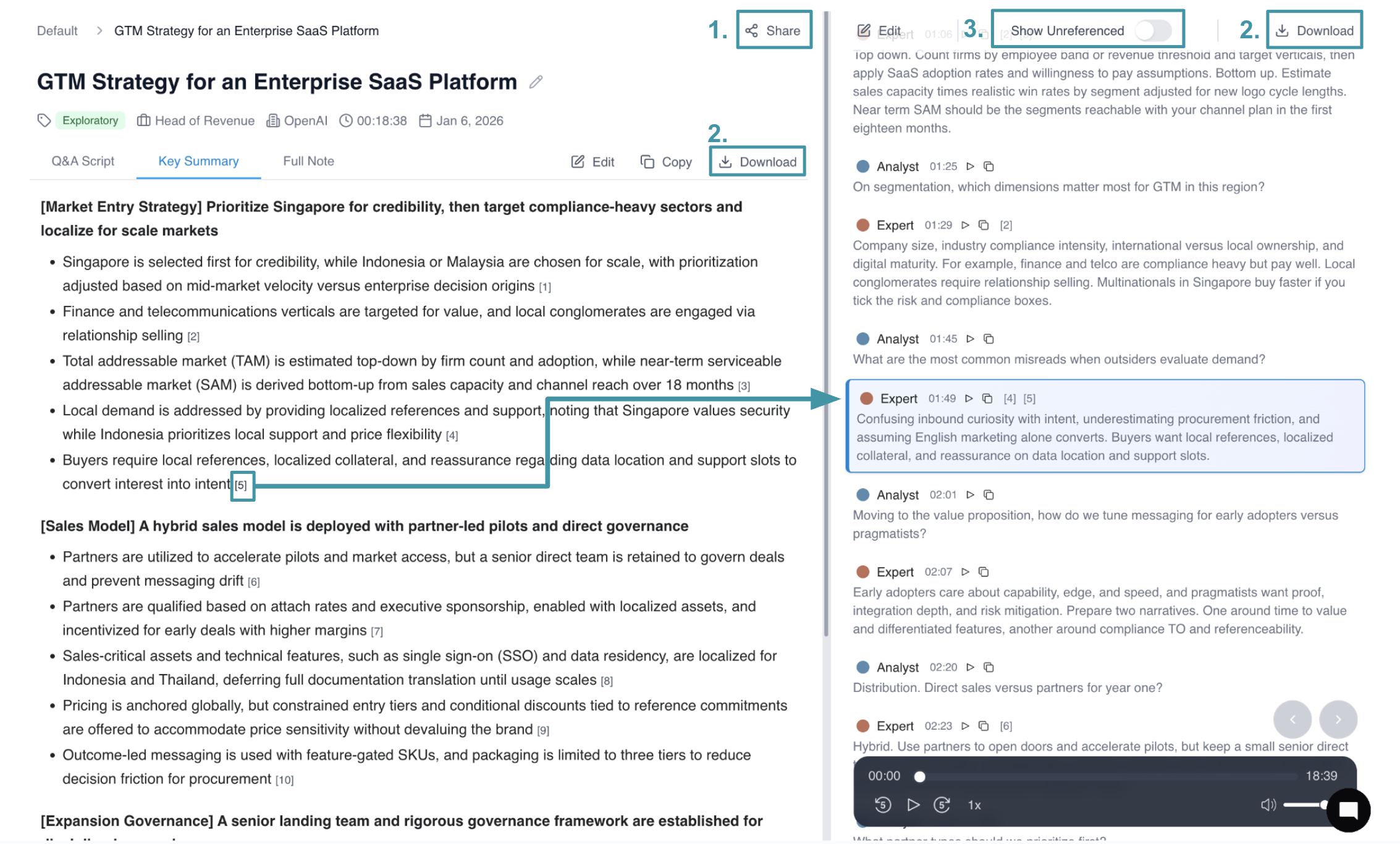
Additional Features
- Share: Generate a shareable link to the note for easy collaboration with team members
- Download: Export notes or transcripts in multiple formats (TXT, XLS, DOC) for offline access and further analysis
- Show Unreferenced: Highlights sections of the transcript that were not referenced in the notes, helping you identify any potentially missed insights or ensure comprehensive coverage
Interview Note Types
Cabos provides three different types of notes, each optimized for specific consulting workflows and stakeholder needs. Whether you're preparing executive summaries, conducting deep analysis, or sharing verbatim insights, our AI-powered note formats ensure you have the right level of detail for every use case.
Key Summary
- Utilizes multi-layer reasoning AI engine to extract up to 5 key insights
- Applies MECE-based consultant thinking and delivers consulting-grade tone and structure
- Use Cases: Sharing clear, digestible insights with Partners, Clients, and Project Managers
Q&A Script
- Reformats content into a clear question-and-answer structure
- A cleaned, professional version of the original transcript
- Corrects errors common in raw AI transcripts
- Standardizes industry jargon and acronyms
- Use Cases:
- When clients request the full transcript
- When consultants need to review verbatim context to find specific quotes
Full Note
- Theme-based comprehensive summary (not timeline-driven)
- Captures all interview details, including every data point and figure
- Organizes insights by topic rather than question order
- Deeply structured for comprehensive analysis and reference
- Use Cases:
- When clients request detailed interview notes
- When consultants are building presentation slides using specific details
3. Search
Cabos helps you quickly search through hundreds of pages of expert interview notes and transcripts to find the insights that matter and the supporting quotes you can directly use in your deliverables.
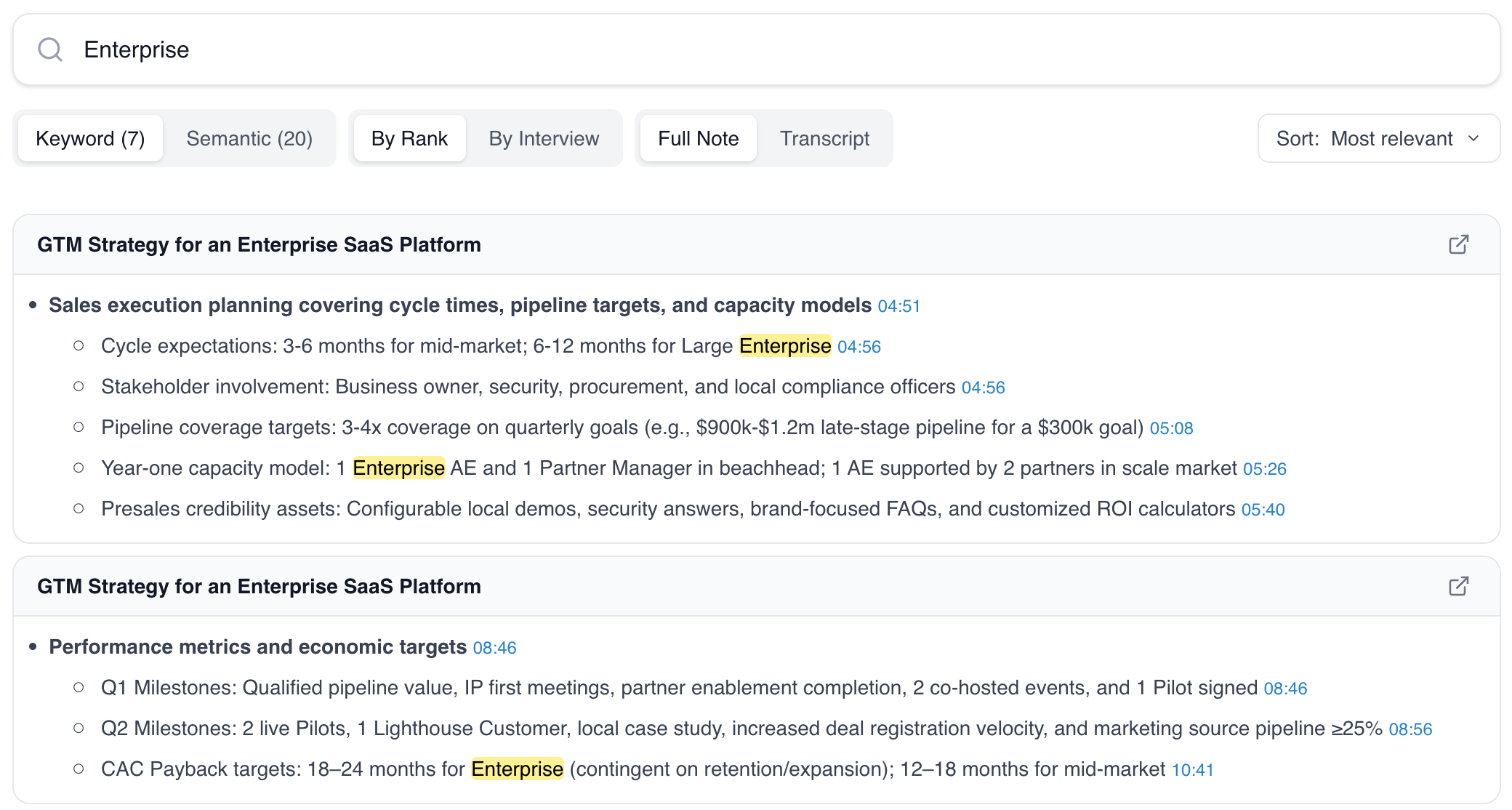
We support both keyword search and semantic search, allowing you to retrieve information precisely and efficiently:
- Keyword search: Ranks results based on exact keyword matches, making it ideal for locating specific terms, names, or phrases.
- Semantic search: Understands context, intent, and synonyms, helping you discover relevant insights even when different wording is used across interviews.