LinkedIn Accounts
Sourcing and outreach in Cabos run from real LinkedIn accounts that you connect. Each seat is one LinkedIn account this organization can connect. Seats are bought once at the organization level and shared across every project in that org.
Open this page from any project: Sourcing → LinkedIn Accounts.
1. Buy seats
Until you have an active subscription (or are inside the trial window), Cabos shows a banner at the top of the page:
- During the trial — "X days left in your free trial. Subscribe to keep adding LinkedIn accounts after your trial ends." Click View plans to open the billing page.
- After the trial / no subscription — "Subscribe to add LinkedIn accounts. An active subscription is required to keep sourcing." Click Subscribe.
On the billing page you choose how many seats you want (1–10) and check out:
- Pick a seat count with the + / − controls. The total updates to the per-month price for that plan tier.
- Click Subscribe to go through Clerk-managed checkout.
- After checkout you're returned to LinkedIn Accounts and can connect that many accounts.
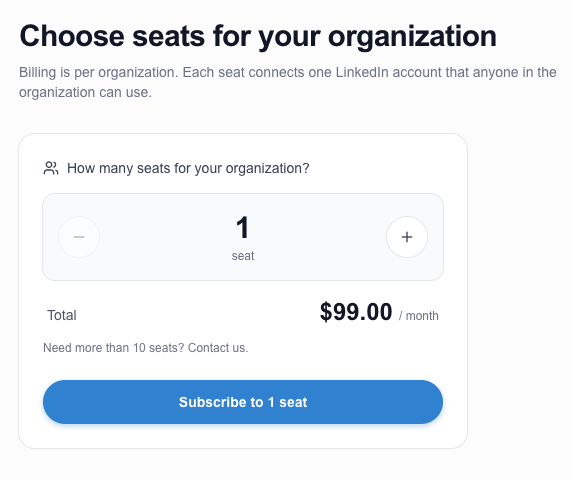
To change seat count later (for example, going from 3 → 5 seats), open the same billing page and pick the new number — the upgrade flow defaults the picker to current + 1 and shows the price difference vs. your current plan.
Seats are org-scoped. If your organization buys 3 seats, the whole org shares those 3 LinkedIn accounts — you don't need to repurchase per project.
Each LinkedIn account can only be connected once across all of Cabos — duplicate connections of the same login are not allowed.
2. Connect a LinkedIn account
Click Add LinkedIn Account and fill in:
- Email — the email used for the LinkedIn login.
- Password — the LinkedIn password.
- Timezone — the timezone the account "operates" in. Cabos uses this to keep outreach inside business hours (9am – 6pm local).
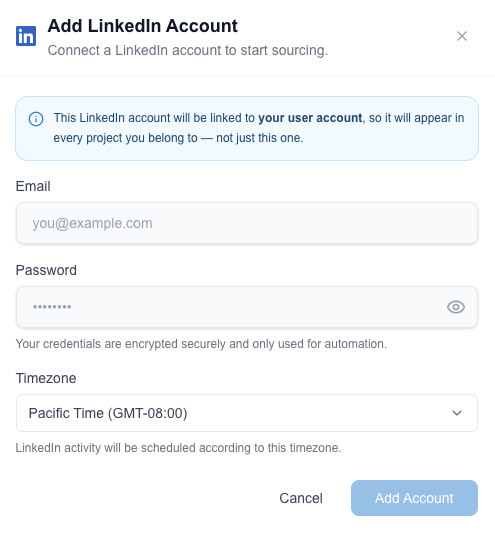
After you submit, LinkedIn verifies the login. Cabos polls every few seconds and shows progress. Verification can take one of two paths:
- Mobile app push — you'll get a notification in the LinkedIn mobile app. Approve the login from your phone.
- SMS passcode (challenge) — Cabos prompts you to enter the SMS code that LinkedIn just texted to your phone. Paste the code and submit.
When verification succeeds the modal closes and the new account appears in the list with an Active badge.
If you typed the wrong email or password the account is dropped and Cabos surfaces "Wrong email or password. Please try again with the correct credentials." Re-open the form to retry.
3. Manage LinkedIn accounts
Each connected account is shown as a card with the LinkedIn email, the user it's linked to, weekly usage counters (profiles, connects, InMails), and a status pill in the top-right.
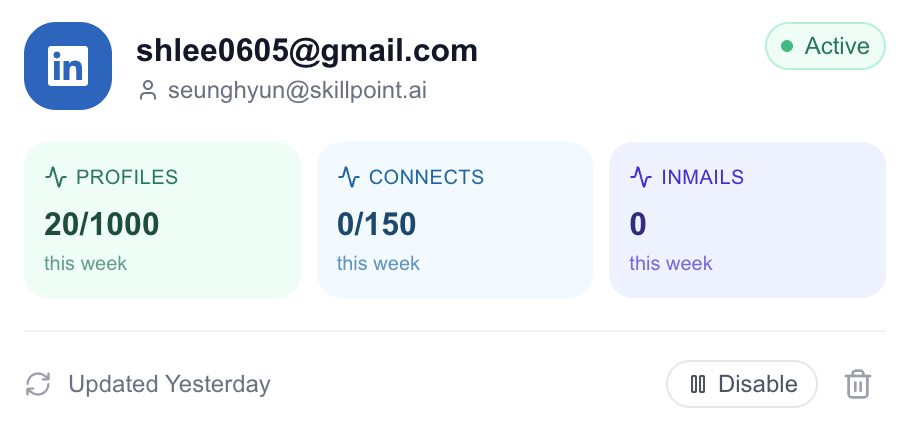
Status pills:
| Status | Meaning | What to do |
|---|---|---|
| Active | Logged in, ready for sourcing/outreach. | Nothing — you're good. |
| Login required | LinkedIn invalidated the session. | Click Refresh / Re-login and re-verify. |
| Error | Something went wrong (rate limit, blocked action, etc.). | Hover the badge for the reason; refresh or contact support. |
| Paused / Stopped | Cabos paused the account (manually or automatically). | Resume from the action menu when you're ready. |
The row's action menu also lets you delete an account, which frees the seat for another LinkedIn login.
4. Limits
To keep your accounts safe, Cabos caps each LinkedIn account based on the subscription we detect after login.
Premium Career
- Profile evaluations — 50 / day, 200 / week
- Connection requests — 20 / day, 50 / week
- InMails — 10 / day
Premium Business
- Profile evaluations — 100 / day, 250 / week
- Connection requests — 20 / day, 100 / week
- InMails — 10 / day
Sales Navigator
- Profile evaluations — 200 / day, 1,000 / week
- Connection requests — 40 / day, 150 / week
- InMails — 30 / day
Outreach is only sent during business hours (9am – 6pm local time) in the account's timezone.
If you have more outreach queued than the cap allows, Cabos paces it automatically across days. You don't need to throttle anything yourself.
Need higher throughput? Reach out to support — caps can be raised on a per-account basis.