Outreach Templates
Reusable LinkedIn outreach messages, scoped to the project. Anyone on the project can pick from them when configuring a segment.
Open from a project: Sourcing → Outreach Templates.
Two template types
- Connection Request — short message attached to a connection request. Capped at 300 characters.
- InMail — paid LinkedIn message with a subject line and longer body. Use to reach 2nd/3rd-degree candidates without first connecting.
Tab counters show how many of each type you have.
Create a template
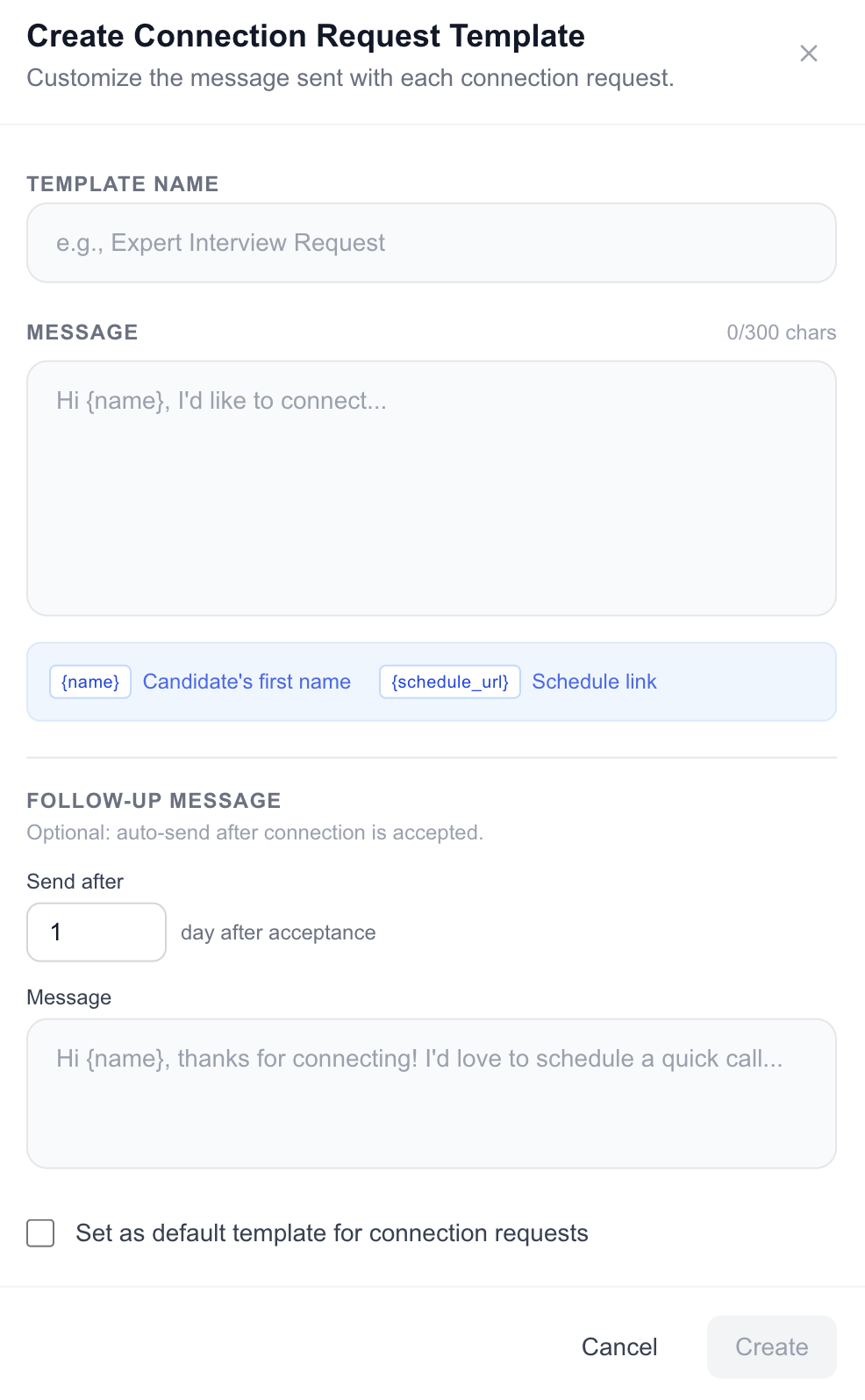
- Switch to Connection Request or InMail and click Add Template.
- Fill in:
- Name — internal label only.
- Subject (InMail only) — required.
- Message — the body. Connection requests have a live 300-char counter.
- Follow-up (optional) — a second message a configurable number of days after the first lands.
- Save.
Click the star on a card to mark it as the default for that type — it'll be pre-selected when you create or edit a segment.
Use in a segment
Pick a template in Step 3 (Outreach) of segment creation, or change it later from the Segment Details drawer. You can also override a template inline when sending outreach to a specific batch.
Edit or delete
Click any card to open it in the editor. Deleting a template that's attached to a segment falls back to a per-segment inline copy saved at config time, so existing segments keep working.